“Is this point to the left or to the right of my path?” Or a more intuitive situation: Is the address point to the left or right of the street? This post explores how to solve this using the 3D cross product with NumPy and Shapely libraries.
1. The Core Problem: Side Determination
When moving along a directed line from point to point , any point in the 2D plane must fall into one of three categories:
Left Side: A counter-clockwise turn is needed to face the point.
Right Side: A clockwise turn is needed to face the point.
Collinear: The point lies exactly on the line (or its infinite extension).
To solve this mathematically, we treat the segments as vectors. Let be our direction and be the offset to our target point.
2. The Math: The 3D Cross Product
While the cross product is natively a 3D operation, it is the perfect tool for 2D side determination.
Geometric Definition
The 3D cross product () produces a new vector that is perpendicular to both inputs. By placing our 2D vectors on the plane (setting ), the resulting cross product vector must point directly along the -axis.
The Right-Hand Rule
The direction of this value follows the Right-Hand Rule:
If your fingers curl from to and your thumb points Up (), the point is to the Left.
If your thumb points Down (), the point is to the Right.
Algebraic Formula
For 2D vectors extended to 3D, the calculation simplifies significantly:
3. Applied Scenario: Path Following
In a real-world application, we don’t just have a single segment; we have a Polyline (). To determine the side relative to the “flow” of the path, we follow these steps:
Find the Nearest Point (): Locate the point on the polyline closest to our target (using Shapely’s project method).
Establish Direction (): * Normal Case: Walk forward along the polyline from to find point .
Endpoint Case: If is the end of the line, walk backward to find a point . To maintain a consistent forward-facing vector, we swap them: let the original be and the new be .
Construct Vectors: Define and .
4. Implementation: NumPy & Shapely
Using Shapely for linear referencing and NumPy for the vector math allows for concise, readable code. We use an epsilon threshold to account for floating-point inaccuracies.
Assume that all coordinates are expressed in a suitable projected Cartesian coordinate system, so Euclidean lengths and planar areas are meaningful. Land subdivision sometimes involves moving a line segment between two non-parallel boundaries to produce a polygon with a specified area.
The Scenario: A user initiates a tool and defines:
Line 1: A fixed vertex A and a direction point B.
Line 2: A fixed vertex C and a direction point D.
Target Area: The required area of the generated trapezoid, expressed in the square units of the projected coordinate system.
The Goal: Calculate the offset distance and the coordinates of the new segment such that the area of the polygon equals the Target Area.
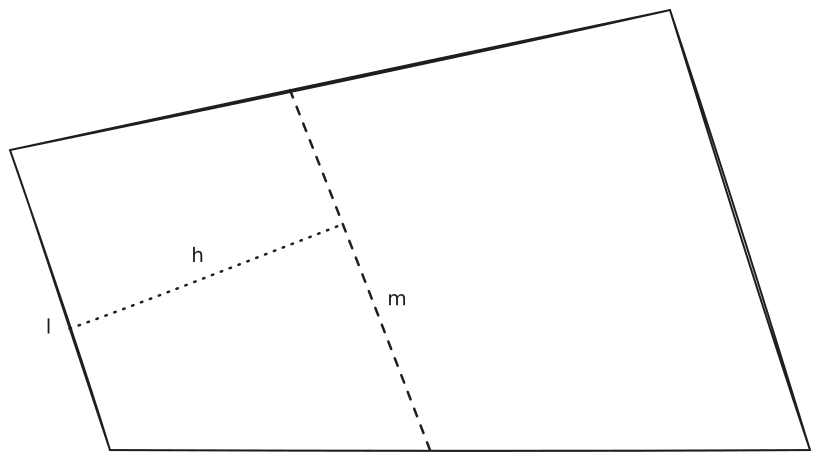
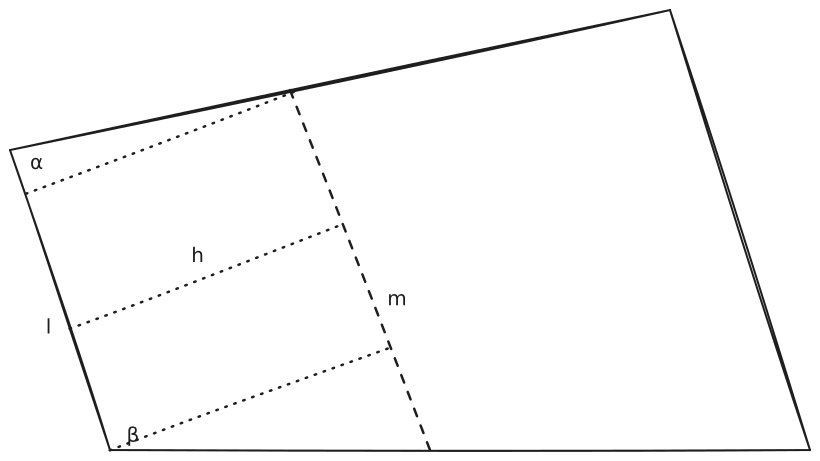
Question: Offset one edge of a quadrilateral (giving a new edge ) to form a new (usually smaller) quadrilateral (parcel) whose area equals a predefined value . Find the offset distance .
Short answer: find the linear equation between offset distance and offset edge , then solve the quadratic equation for the offset :
It is easy to pick the correct root as the solution for .
The linear relationship between and follows from trigonometry:
The quadratic equation of is:
There are other ways to explain .
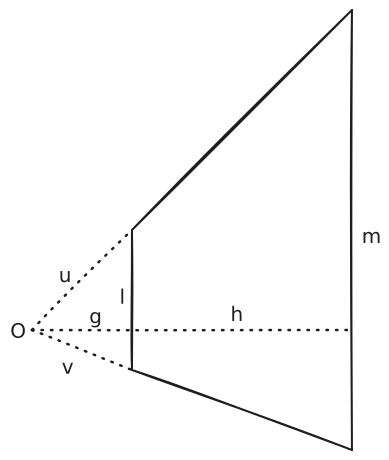
Let be the origin; , and are vectors, so , , where is the scale ratio. Then the linear equation relating and can be proved.
From the perspective of similar triangles,
Simplified as:
In a GIS work environment, offsetting a line or reading the length of a line is straightforward and convenient. In order to get the equation of and , a trick can be used here.
Start from the general form:
Let ; then
Offset by a specific value — say 10 — and read from the GIS software; then
The problem is solved without needing angles or the distance , which could be far away.
My practice is to put the logic into an Excel form with three parameters.
Area of the new parcel, in Length of the original edge, in Length of the edge after offsetting by , in Required offset, in B69: =IFERROR((-B67+SQRT(B67B67+2(B68-B67)/10*B66))/((B68-B67)/10),0)
The Openwrt VM running in my fanless pc is the main router of home network. Recently I got a new router which has 6 NICs and a more powerful CPU. So I need to migrate the Openwrt VM to the new machine.
The basic idea of migration is backup the vm, move the omv file to the new machine, then restore it. Here are the steps for the whole process.
Install Proxmox VE on the new machine and set up all the network bridges.
Backup the Openwrt VM, move the backup file to the new Proxmox VE node, and restore the VM by following the official wiki Backup_and_Restore.
On the new PVE node, remove the old network devices, then add new network devices according to the new hardware platform and Linux bridge setting.
Shut down the old Openwrt VM.
Start the new Openwrt VM, login to web ui. Update the device list for WAN and BR-LAN.
Connect the WAN cable to the designated NIC on the new PVE node, restart the VM and the modem if necessary. Then the new Openwrt VM should work good as router.
In offshore petroleum exploration practice, the coordinates of blocks designed by geologists for a particular purpose must be provided in Degree-Minute-Second format: the degree uses 2 or 3 digits, the minute uses 2 digits, and the second uses 2 digits, in one of four values — 00, 15, 30 or 45 (in increments of a quarter of a minute). All coordinates must be listed in clockwise order, starting from the name vertex (the most northeast vertex). Such a block is called a “standard block”.
Designing blocks is daily work in the resource exploration industry. Blocks serve many purposes, including but not limited to administration (relinquishing part of a block, dissolving several blocks into one), block bid campaigns, and so on.
Geologists usually draft blocks on a projected geological setting basemap. Unfortunately, the mapping software in use has no snap functionality. It can only export polygons (the drafted blocks) in projected XY format. It can, however, display a geodetic reference grid at 15-second intervals.
A new workflow was designed to handle the blocks:
Geologists design blocks whose vertices are visually, but not precisely, on the nodes of a 15-second geodetic reference grid.
All blocks reside in a layer, with valid identifiers.
Export the design layer of blocks in projected format as a text file.
Write a program to read the file and generate standard blocks.
3. Implementation
The implementation is a Python package called “transco” (TRANSformation of COordinates), written in 2022 and in use since then.
transco uses pyproj to perform the transformation. pyproj is a Python interface to PROJ. Shapely is also used. Shapely is a Python wrapper for GEOS.
3.1 class
transco uses three classes to represent the data: Layer, Block and Point. Points are properties of a Block instance, and blocks are properties of a Layer instance.
classBlock: """A raw block resides in a Layer object."""
def__init__(self, layer, block): self.layer = layer self.location = self.layer.location self.order = 0 self.crs = self.layer.crs self.transformer = self.layer.transformer name_str = block[0][0] try: name, order = name_str.split("--") order = int(order) if name.strip(): self.name = name.strip().replace("/", "").replace("\\", "") if order >= 1: self.order = order except: self.name = name_str.rstrip("--").strip().replace("/", "").replace("\\", "") ifnot self.name: raise Exception("Failed to create a name for this Block") self._points = [] for p in block: point = Point(self, p) self._points.append(point) self.__regular_points() self.__unparallel_points() self.get_code_name()
@property defpoints(self): return self._points
The block object gets CRS information from its Layer object.
As before, a Point instance gets its CRS from its Block object.
3.2 Function
The basic idea is that the original XY coordinates are transformed into degrees and then snapped to the nearest geodetic reference grid node by the _offset method.
Several methods modify the blocks: rotating points if they are not clockwise, removing redundant points, checking for errors, computing block names by spatial relationship, and so on.
defd2dms(x): """ Transform a single float degree value to DMS format. return a tuple of degree, minute, second in float. >>> d2dms(113.5) (113.0, 30.0, 0.0) >>> d2dms(20.254166667) (20.0, 15.0, 15.000001199999247) """ d_decimal, d = math.modf(x) m_decimal, m = math.modf(d_decimal * 60) s = m_decimal * 60 return d, m, s
The last step is defining functions to call methods on the objects.
defavailable_crs(defined_crs): all_crs = {} for key, value in defined_crs.items(): if value: all_crs[key] = value return all_crs
defshow_help(**kw): print(__desc__) print("Version {}".format(__version__)) print("Author: ", __author__) print(__transco_help__) location = kw.get("location", None) if location: try: crs = get_crs("proj", "wgs84utm", location) except: print("Failed to get CRS.") raise if crs: print("Current CRS:") print(crs.name) print("Area of Use:") print(crs.area_of_use)
defmain(): parser = argparse.ArgumentParser(description=__desc__) parser.add_argument( "file", help="the input file, default is 'df_design.txt'.", nargs="?" ) parser.add_argument( "location", help="the location for projection selection, default is 'location'.", nargs="?", ) parser.add_argument( "-a", "--all", action="store_true", help="save all output files" ) parser.add_argument("--version", action="store_true", help="show version") parser.add_argument("--allcrs", action="store_true", help="show all available CRS") args = parser.parse_args() try: ...
After that, I can call the main function from the CLI, call the functions and classes directly in an interactive Python environment, or use it in a Jupyter notebook.
4. Results
transco has been in use since 2022. A 50-block batch that previously took roughly an hour per block to prepare by hand in Excel now runs in about 10 minutes.
The larger gain is in the revision loop. Geologists revise their block designs repeatedly before a final version is agreed, and the manual cost was paid again on every revision. Re-running transco costs nothing, so a design can be iterated as many times as the work requires.
I tried to use Linux back in 2004, and started to use it as a daily operating system in 2016. Maybe because I wasn’t (though I tried to be one) an IT worker, I never met a person using Linux in person (using Redhat Workstation for Seismic Data Interpretation doesn’t count). I was asked by many people why using Linux?
OpenWrt is an open source linux system tailored for routers. Using an offical OpenWrt VM system as router has obvious benefits: enjoy the most flexibility of OpenWrt and get rid of the outdated vendor firmware.
I have used my network scanner through Windows for a long time. It works well except I need to get a Windows laptop. Although the default storage path of the scanner resides in a samba server, it is still tedious to do daily scan. I managed to set it up on Linux. This blog is for my reference.